本文最后更新于 2026-04-21T09:54:01+00:00
0x00 起因
最近要使用StarUML绘制一些类图,默认选择了试用装,但是在导出后发现,图片居然满屏的UNREGISTERED水印!
试用装居然不让我正常导出,可恶…
注:本文仅学习交流技术原理,请购买正版许可证支持正版
0x01 Step1
定位到该app所在文件夹
1
2
3
4
5
6
7
8
9
10
11
12
StarUML/
观察文件结构不难看出,这是一个基于electron框架构建的app
好东西都在app.asar中,我们先进行解压
此处使用npm安装的asar工具
安装命令:
先将app.asar复制到单独文件夹,然后进行解压
1 asar extract app.asar ./app
然后就发现,这个包居然没有任何混淆!源码带注释就这么水灵灵的放在眼前
1
2
3
4
5
6
7
8
9
10
11
12
13
14
15
16
17
18
19
20
21
app/
0x02 Step2
来到src文件夹下,注意到在src/dialogs/下有个license-activation-dialog.js
从名字不难看出,这应该是有关许可证的dialog的部分
其大致逻辑为从store里面读取相关状态,然后渲染到界面,提供激活/反激活的UI入口,还有一些激活辅助项
1
2
3
4
5
6
7
8
9
10
11
12
13
14
15
16
17
18
19
20
21
async function updateDialog ($dlg ) {await app.licenseStore .fetch (); const licenseStatus = app.licenseStore .getLicenseStatus ();const $sectionTrialNotExpired = $dlg.find (".trial-not-expired" );const $sectionTrialExpired = $dlg.find (".trial-expired" );const $sectionLicenseActivated = $dlg.find (".license-activated" );const $sectionLicenseNotActivated = $dlg.find (".license-not-activated" );const $trialDaysLeft = $dlg.find (".trial-days-left" );const $activeStatus = $dlg.find (".active-status" );const $productDisplayName = $dlg.find (".product-display-name" );const $licenseHolderName = $dlg.find (".license-holder-name" );const $deviceId = $dlg.find (".device-id" );hide ();hide ();hide ();hide ();
1
2
3
4
5
6
7
8
9
10
11
12
13
14
15
16
17
18
19
20
21
22
23
24
25
26
27
28
29
30
31
async function showDialog (await app.licenseStore .fetch (); const context = {Strings : Strings ,metadata : global .app .metadata ,const dialog = app.dialogs .showModalDialogUsingTemplate (Mustache .render (licenseActivationDialogTemplate, context),const $dlg = dialog.getElement ();const $buyButton = $dlg.find (".buy-button" );const $licenseKey = $dlg.find (".license-key" );const $activateButton = $dlg.find (".activate-button" );const $deactivateButton = $dlg.find (".deactivate-button" );const $copyDeviceIdButton = $dlg.find (".copy-device-id-button" );const $licenseManagerButton = $dlg.find (".license-manager-button" );await updateDialog ($dlg);click (async function (click (async function (return dialog;
读一下相关代码,在进行UI相关渲染前都调用了
1 await app.licenseStore .fetch ();
再看看其他部分,通过搜索UNREGISTERED找到了渲染水印逻辑所在,位于diagram-export.js
1
2
3
4
5
6
7
8
9
10
11
12
13
14
15
16
17
18
19
20
21
22
23
24
const licenseStatus = app.licenseStore .getLicenseStatus ();if (licenseStatus.trial ) {drawWatermark (width ,height ,70 ,12 ,"UNREGISTERED" ,else if (licenseStatus.edition !== "PRO" ) {const dgmType = diagram.constructor .name ;if (isProDiagram (dgmType)) {drawWatermark (width ,height ,45 ,12 ,"PRO ONLY" ,
这表明,app的大部分地方似乎都依赖app.licenseStore来验证许可证状态
搜索一下licenseStore,发现在license-store.js中导出
1 module .exports = LicenseStore ;
进一步查看这个文件
1
2
3
4
5
6
7
8
9
10
11
12
13
14
15
16
17
18
19
20
21
22
23
24
25
26
27
28
29
30
31
32
33
34
35
36
37
38
39
40
41
42
43
44
45
46
47
48
49
50
51
52
53
54
55
56
57
58
59
60
61
62
63
64
65
66
67
68
69
70
71
72
73
74
75
76
77
78
79
80
81
82
83
84
85
86
87
88
89
90
91
92
93
94
95
96
97
98
99
100
101
102
103
104
105
106
107
108
109
const { ipcRenderer } = require ("electron" );const { EventEmitter } = require ("events" );const LicenseActivationDialog = require ("../dialogs/license-activation-dialog" );class LicenseStore extends EventEmitter {constructor (super ();this .licenseStatus = {activated : false ,name : null ,product : null ,edition : null ,productDisplayName : null ,deviceId : null ,licenseKey : null ,activationCode : null ,trial : false ,trialDaysLeft : 0 ,async fetch (const licenseStatus = await ipcRenderer.invoke ("license.get-license-status" ,this .licenseStatus = licenseStatus;this .emit ("statusChanged" , this .licenseStatus );async getDeviceId (try {const deviceId = await ipcRenderer.invoke ("license.get-device-id" );async activate (licenseKey ) {try {const result = await ipcRenderer.invoke ("license.activate" , licenseKey);if (!result.success ) {toast .error (result.message || "Activation failed" );catch (err) {console .error (err);toast .error ("Activation failed" );await this .fetch ();async deactivate (try {const result = await ipcRenderer.invoke ("license.deactivate" );if (!result.success ) {toast .error (result.message || "Deactivation failed" );catch (err) {console .error (err);toast .error ("Deactivation failed" );await this .fetch ();async validate (const result = await ipcRenderer.invoke ("license.validate" );const licenseStatus = await ipcRenderer.invoke ("license.get-license-status" ,this .licenseStatus = licenseStatus;return result;getLicenseStatus (return this .licenseStatus ;async checkTrialMode (const licenseStatus = await ipcRenderer.invoke ("license.get-license-status" ,if (licenseStatus.trial ) {LicenseActivationDialog .showDialog ();async htmlReady (try {await this .fetch ();const result = await this .validate ();if (!result.success ) {toast .error (result.message || "License validation failed" );await this .checkTrialMode ();await this .fetch ();catch (err) {console .error (err);console .log ("License validation failed" );module .exports = LicenseStore ;
由此可知,这似乎是一个中间层,是renderer侧状态门面,通过IPC invoke调用主进程的license handler来取得许可证相关信息,并传递给UI层
到这里已经足够,我们不需要知道主进程的license handler具体是怎么与服务器交互取得注册信息的
只需要在这里插桩,拦截所有IPC请求,返回我们的虚假许可证信息给renderer,即可绕过绝大部分许可证限制
0x03 Step3
第一步就是定义一个fake license信息,注释掉构造函数中的原初始化赋值,换成我们的fake license
1
2
3
4
5
6
7
8
9
10
11
12
this .licenseStatus = {activated : true , name : "User" , product : "staruml-v7" , edition : "PRO" , productDisplayName : "StarUML v7.0.0" , deviceId : "unlimited-device" , licenseKey : "key" , activationCode : "code" , trial : false , trialDaysLeft : 0 ,
然后是处理那些许可证相关方法
1
2
3
4
5
6
7
8
async fetch (this .emit ("statusChanged" , this .licenseStatus );
1
2
3
4
5
6
7
8
9
10
async getDeviceId (try {return this .licenseStatus .deviceId ;catch (err) {console .error (err);return this .licenseStatus .deviceId ;
1
2
3
4
5
6
7
8
9
10
11
12
13
async activate (licenseKey ) {await this .fetch ();
1
2
3
4
5
6
7
8
9
10
11
12
13
async deactivate (await this .fetch ();
1
2
3
4
5
6
7
8
9
10
async validate (return { success : true , message : "License valid" };
1
2
3
4
5
6
7
8
9
async checkTrialMode (
然后打包回去
1 asar pack ./app app.asar
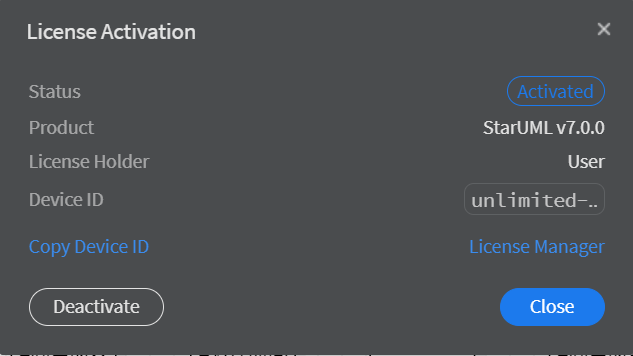
复制并替换原app.asar,启动StarUML,查看激活状态
0x04 深挖
在翻阅相关资料,并且继续分析后发现
1 2 3 4 5 6 7 8 9 10 11 12 13 14 15 16 17 18 19 20 21 22 23 24 25 26 ipcMain.handle ("license.get-device-id" , async (event) => {const deviceId = await getDeviceId ();return deviceId;handle ("license.activate" , async (event, licenseKey) => {const result = await remoteActivate (licenseKey);return result;handle ("license.deactivate" , async (event) => {const result = await remoteDeactivate ();return result;handle ("license.validate" , async (event) => {let result = await localValidate ();if (result.success ) {await remoteValidate ();return result;handle ("license.get-license-status" , async (event) => {return getLicenseStatus2 ();
这些方法最终指向license-client.js
分析license-client.js发现了一些有趣的东西
试用的信息存储在lib.so里面(win下面有个.so难道不可疑吗…)
1
2
3
const LICENSE_TRIAL_MODE_ENABLED = true ;const LICENSE_TRIAL_TIMESTAMP_FILE_NAME = "lib.so" ;const LICENSE_TRIAL_MODE_DAYS = 30 ;
神秘硬编码key
1
2
3
4
const LICENSE_CRYPTO_KEY = "y0JMc9mvB1uvIi82GhdMJQXzVJxl+1Lc0RqZqWaQvx0=" ;const LICENSE_SERVER_URL ="https://dev.staruml-io-astro.pages.dev/api/license-manager" ;const LICENSE_FILE_NAME = "activation.key" ;
解码后为
1 CB424C73D9AF075BAF222F361A174C2505F3549C65FB52DCD11A99A96690BF1D
此key用于下文的AES解密
1 2 3 4 5 6 7 8 9 10 11 12 13 14 async function importAESKey (base64Key ) {const keyBuffer = base64ToArrayBuffer (base64Key);const imported = await crypto.subtle .importKey ("raw" ,name : "AES-GCM" },true ,"encrypt" , "decrypt" ],return imported;
离线许可证验证方法
1
2
3
4
5
6
7
8
9
10
11
12
13
14
15
16
17
18
19
20
21
22
23
24
25
26
27
28
29
30
31
32
33
34
35
36
37
38
39
40
41
42
43
44
45
46
47
48
49
50
51
52
53
54
55
56
async function localValidate (try {const filePath = path.join (app.getPath ("userData" ), LICENSE_FILE_NAME );const activationCode = await fs.readFile (filePath, "utf8" );const decoded = await decodeActivationCode (activationCode);const deviceId = await getDeviceId ();const isProductMatched = decoded.product === LICENSE_PRODUCT_ID ;const isDeviceIdMatched =deviceId === "*" || decoded.deviceId === deviceId;if (!isProductMatched) {await checkTrialMode ();await localDeactivate ();return {success : false ,message : "Invalid activation code (product mismatch)" ,if (!isDeviceIdMatched) {await checkTrialMode ();await localDeactivate ();return {success : false ,message : "Invalid activation code (device ID mismatch)" ,activated : true ,name : decoded.name ,product : decoded.product ,edition : decoded.edition ,productDisplayName : getProductDisplayName (product ,edition ,deviceId : decoded.deviceId ,licenseKey : decoded.licenseKey ,activationCode : activationCode,trial : false ,trialDaysLeft : 0 ,return {success : true ,message : "Local validation successful (activated)" ,catch (err) {await localDeactivate ();return {success : true ,message : "Local validation successful (not activated)" ,
从userData/activation.key中读activationCode,用decodeActivationCode()解密出来,取当前机器deviceId,然后进行判断
1
2
decoded.product === LICENSE_PRODUCT_ID
用来检查本地的激活码是否合法
一个远程验证方法
1 2 3 4 5 6 7 8 9 10 11 12 13 14 15 16 17 18 19 20 21 22 23 24 25 26 27 28 29 30 31 32 33 34 35 36 37 38 39 40 41 42 43 44 45 46 47 48 49 50 51 52 53 54 55 56 57 58 59 60 61 async function remoteValidate (const { activated, activationCode, deviceId } = licenseStatus;if (!activated) {return {success : true ,message : "Validation successful (not activated)" ,try {if (deviceId === "*" ) {const response = await fetch (`${LICENSE_SERVER_URL} /ping` , {method : "POST" ,if (response.ok ) {await localDeactivate ();return {success : false ,message : "License deactivated (illegal offline use)" ,else {const response = await fetch (`${LICENSE_SERVER_URL} /validate` , {method : "POST" ,headers : {"Content-Type" : "application/json" ,body : JSON .stringify ({activation_code : activationCode,if (response.ok ) {const data = await response.json ();if (data.success ) {const decoded = await decodeValidationCode (data.validation_code );if (decoded.deviceId === deviceId) {return {success : true ,message : "Validation successful (activated)" ,await localDeactivate ();return {success : false ,message : "License deactivated by server" ,catch (err) {return {success : true ,message : "Validation successful (offline)" ,
有个有趣的地方,如果本地已经activated并且deviceId === "*",即离线激活的情况,会向服务器/ping,如果请求可达则撤销本地的激活状态(还有秋后算账环节)
由此总结远程/离线激活的流程
取deviceId
POST到/activate
提交device_id license_key
服务器返回activation_code
本地再行校验
调用localActivate()
localActivate()的实现:
1
2
3
4
5
6
7
8
9
10
11
12
13
14
15
16
17
18
19
20
21
async function localActivate (activationCode ) {try {const filePath = path.join (app.getPath ("userData" ), LICENSE_FILE_NAME );await fs.writeFile (filePath, activationCode, "utf8" );catch (err) {console .error ("Local activation failed:" , err);const decoded = await decodeActivationCode (activationCode);activated : true ,name : decoded.name ,product : decoded.product ,edition : decoded.edition ,productDisplayName : getProductDisplayName (decoded.product , decoded.edition ),deviceId : decoded.deviceId ,licenseKey : decoded.licenseKey ,activationCode : activationCode,trial : false ,trialDaysLeft : 0 ,
流程为
把 activationCode 写入 userData/activation.key
解密出字段
更新 licenseStatus
关闭试用,清零 trialDaysLeft
0x05 结束
折腾大概就到这里了,没有混淆实属良善,发一张好人卡
最后再次声明
仅做技术交流之用,请支持正版软件